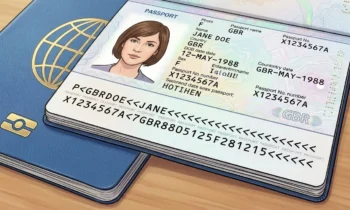
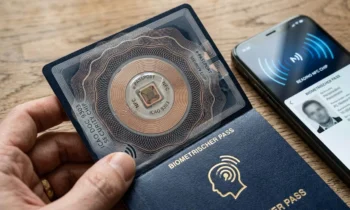
Antenna positioning, access-data errors, device limitations and document damage can affect scanning, making a failed attempt inconclusive on its own.
Washington, DC, October 19, 2026 — A smartphone that fails to read an electronic passport chip does not automatically establish that the document lacks a chip, contains a defective electronic component or is otherwise invalid, because several ordinary technical and physical conditions can interrupt contactless communication.
Antenna alignment, incorrectly captured machine-readable information, incompatible software, protective phone cases, interrupted communication, and damage to the passport’s embedded antenna can all produce similar failure messages, making careful troubleshooting important before anyone interprets one unsuccessful scan as meaningful evidence.
Smartphone Passport Reading Depends on Several Systems Working Together
A successful electronic passport scan requires the phone’s NFC hardware, the passport antenna, the embedded chip, the reader application, and the relevant access-control information to work together during one continuous contactless session.
Failure at any point can prevent the application from retrieving information even when every other component functions normally, which is why troubleshooting should start by identifying where communication stopped.
The International Civil Aviation Organization’s machine-readable travel document standards define the broader technical architecture governing electronic travel documents, supporting interoperable contactless communication and electronic passport security.
Understanding this multi-stage process helps travelers avoid treating every generic cannot-read message as a definitive statement about the passport itself.
NFC Antenna Positioning Is One of the Most Common Variables
Smartphone NFC antennas vary by device design, so the most effective reading position can differ considerably between phones from different manufacturers and even between generations from the same company.
Some phones communicate most effectively near the upper portion of the device, while others require the center or another area to be positioned directly over the passport’s embedded antenna.
If those two antennas are poorly aligned, insufficient energy may reach the passive passport chip, and the electronic session may never start.
Moving the phone slowly across the passport while following the application’s positioning instructions can therefore produce a successful read without any change to the document itself.
Passport Antenna Placement Also Varies
The electronic passport antenna can be integrated into the booklet cover, polycarbonate identity component or another area depending upon the issuing country and document generation.
A scanning technique that works immediately with one passport may therefore fail with another even when both documents contain fully functional electronic components.
Travelers should avoid assuming the chip sits directly under the visible international ePassport symbol because that marking identifies electronic capability, not the precise physical location of internal components.
Carefully adjust the phone and booklet’s relative position to find the strongest area for contactless coupling.
The Passport Chip Has No Battery
Electronic passports use passive chips that depend upon the reader’s electromagnetic field for the energy needed to operate and communicate.
If antenna alignment is weak or the phone moves away during the session, the chip can lose power immediately and the ongoing electronic exchange can terminate.
This sensitivity explains why applications often instruct users to hold the smartphone still against the passport for several seconds while the app retrieves information.
A partial or interrupted read therefore may reflect an unstable radio-frequency connection rather than a malfunctioning electronic passport.
Thick Phone Cases Can Interfere With Communication
Protective smartphone cases can increase the physical distance between the NFC antenna and passport, while cases containing metal plates, magnetic accessories or other materials can interfere more substantially with radio-frequency communication.
Removing the case can sometimes improve passport reading, especially when the application repeatedly detects the document but loses communication before it can complete data retrieval.
Wallet-style cases containing payment cards or other contactless credentials can also complicate the scanning environment and should generally be moved away during troubleshooting.
Eliminate these practical variables before drawing conclusions about the passport’s electronic functionality.
Metal Surfaces Can Disrupt NFC Performance
Placing the passport on a metal desk, laptop or other conductive surface while attempting to scan it can alter the radio-frequency field and reduce the quality of communication between the phone and document.
A flat nonmetallic surface generally provides a simpler environment for repeated reading attempts.
Nearby contactless cards, phones or electronic devices can also occasionally complicate troubleshooting, making an uncluttered scanning area preferable when diagnosing persistent failures.
Changing the environment can therefore resolve problems that initially appear to originate within the passport.
Incorrect MRZ Capture Can Prevent Electronic Access
Many passport-reading applications begin by capturing information from the machine-readable zone before initiating NFC communication with the chip.
If the application misreads even one relevant character, the access-control procedure may use incorrect values, and the passport can reject the attempted session.
Passport numbers containing visually similar letters and numbers can be particularly vulnerable to optical recognition errors when lighting, glare or camera focus is poor.
Travelers should therefore confirm the machine-readable information the application captured before assuming a subsequent access failure originated with the electronic component.
Dates Must Also Be Captured Correctly
Electronic passport access procedures can depend upon information such as the holder’s date of birth and document expiration date, meaning incorrect recognition of either value can prevent successful communication.
An application may display the visible identity page correctly while still capturing one character incorrectly in the structured MRZ information used internally.
Manually correcting the data, where the application permits it, or rescanning the machine-readable zone under better lighting can sometimes solve an apparent chip problem.
This relationship illustrates why optical capture and NFC communication should be understood as interconnected stages rather than unrelated features.
BAC Errors Can Look Like NFC Failures
Passports using Basic Access Control rely on document-derived information to establish protected communication with a compatible reader.
If the reader derives incorrect access values from a misread MRZ, the authentication exchange can fail even though the phone successfully energizes and communicates with the chip at the radio-frequency level.
A consumer application may simplify that technical distinction into a generic unable-to-read message that gives the user little information about the actual failure stage.
Repeating the MRZ capture accurately is therefore an important troubleshooting step before concluding that the chip cannot be detected.
PACE Compatibility Can Also Matter
Newer electronic passports can use Password Authenticated Connection Establishment (PACE), which provides stronger cryptographic protection for chip access.
A passport application needs proper support for the document’s protocol configuration to establish the required secure session.
An outdated or poorly implemented reader application may therefore struggle with a perfectly functional passport whose security architecture differs from the software’s supported configurations.
Application updates or a different reputable passport-reading tool can sometimes resolve these compatibility issues without changing the document.
Generic NFC Apps May Not Understand Passports
An electronic passport is not an ordinary NFC tag, meaning generic applications designed to read contactless cards, product tags or simple identifiers may not understand its protected file structure and access protocols.
Such an application might report that no readable tag exists, even while specialized travel-document software successfully communicates with the same passport.
Users should therefore distinguish between the phone’s general NFC capability and the software support required specifically for electronic machine-readable travel documents.
A negative result from an unrelated NFC utility provides little useful evidence about passport functionality.
Older Phones May Have Hardware Limitations
Smartphones differ in NFC antenna sensitivity, radio-frequency performance and operating-system support, particularly across devices separated by several years of technological development.
An older phone may communicate unreliably with a passport that a newer device reads without difficulty, especially when antenna coupling is marginal.
Hardware limitations can therefore produce persistent failures that incorrectly appear to implicate the document.
Testing with another compatible device can help distinguish phone-specific behavior from a problem consistently associated with the passport.
Software Updates Can Affect Compatibility
Mobile operating systems and application frameworks change over time, which can affect how NFC communication works or which passport protocols an application supports.
An outdated passport reader may contain bugs or lack support for newer document generations, while an application update can improve compatibility and authentication capabilities.
Users experiencing repeated problems should confirm that both the operating system and passport-reading software are reasonably current before assuming the document is the issue.
The technical ecosystem around the passport can change even if the physical booklet remains the same.
Moving the Phone Can Interrupt an Ongoing Read
Electronic passport reading can involve several sequential operations, including access establishment, secure messaging, file retrieval, and cryptographic checking, meaning the contactless connection may need to remain stable longer than an ordinary NFC payment transaction.
Removing or shifting the phone too early can interrupt communication after the application has already detected the chip.
The user may then receive a failure message even though the initial contactless interaction was completely successful.
Holding the device steadily in the strongest reading position until the application confirms completion can prevent these avoidable interruptions.
Passport Covers Can Influence Scanning
A protective passport wallet, radio-frequency shield or thick document cover can increase distance between the smartphone and the embedded antenna sufficiently to prevent reliable communication.
Removing the passport from additional covers before scanning can therefore improve NFC performance.
Shielding products are designed to interfere with radio-frequency communication, making scanning through them unlikely to succeed.
The simplest troubleshooting step is to place the uncovered passport directly against, or immediately beside, the smartphone’s NFC area.
Physical Damage Can Affect the Embedded Antenna
The passport’s antenna is an essential part of the electronic system, and severe bending, cracking or other physical damage can interrupt the conductive path needed for contactless communication.
Because the antenna can extend across a relatively large area of the booklet or data-page structure, damage doesn’t need to occur directly beside the chip to affect performance.
A passport can therefore remain visually recognizable while becoming electronically unreadable after substantial physical stress.
Persistent failure across multiple compatible readers may justify consultation with the issuing authority, especially when the document shows obvious structural damage.
Chip Damage and Antenna Damage Are Different Problems
The microchip and antenna perform related but distinct functions, meaning failure of either component can prevent a successful scan.
An intact chip cannot operate if a damaged antenna fails to deliver sufficient energy, and a functioning antenna cannot compensate for a defective integrated circuit.
Consumer applications generally cannot determine which internal component failed based on an unsuccessful scan.
Specialized government equipment and document examination can provide much more reliable evidence when a hardware problem is suspected.
Water and Heat Can Affect Passport Electronics
Passports are designed for durable travel use, but severe environmental exposure can still damage electronic and physical components.
Water intrusion, prolonged excessive heat, or repeated sharp bending may affect the antenna, chip connections, or laminated structures around the electronics.
A document that experienced such conditions may develop electronic problems even when its printed information remains readable.
Travelers should contact the issuing authority when a passport has suffered substantial physical damage rather than relying solely upon repeated smartphone scanning.
One Failed Attempt Has Limited Evidentiary Value
Because so many independent variables can interrupt the reading process, a single unsuccessful scan provides little basis for determining whether the passport is genuine, counterfeit or electronically defective.
The phone, software, MRZ capture, antenna positioning, and document condition all need consideration before the result becomes technically meaningful.
Repeated failures across several compatible devices under controlled conditions provide more useful information than one unsuccessful attempt, though even that result does not independently establish document authenticity.
Authoritative conclusions should come from the issuing authority or a properly equipped professional inspection, not a consumer-device error message.
A Successful Read Also Has Limits
Just as a failed scan does not prove a passport invalid, a successful scan does not automatically establish complete authenticity.
An application may retrieve a photograph and biographical information without validating the digital signature, certificate trust or current administrative status of the passport.
The meaning of success therefore depends upon which cryptographic checks the application actually performs.
Travelers should interpret both successful and unsuccessful results with the same caution rather than treating either outcome as a complete verification decision.
Passive Authentication Is a Separate Step
After accessing the chip, compatible software can perform Passive Authentication to examine the integrity of signed electronic data.
This process compares cryptographic hashes and validates digital signatures, rather than merely confirming the chip responds to NFC communication.
An application that can’t access the chip obviously cannot complete those later checks, but access failure alone doesn’t reveal why communication stopped.
Understanding these distinct stages makes troubleshooting considerably more precise.
Certificate Trust Is Yet Another Layer
Even after an application validates the mathematical signature protecting the passport data, meaningful governmental authentication depends upon establishing trust in the signing certificate.
The ICAO Public Key Directory helps participating authorities exchange certificate information used during cross-border electronic passport validation.
Consumer applications may not have the same certificate environment or continuously updated trust material as official inspection systems.
A smartphone result therefore differs in scope from an authoritative government passport examination.
Smartphone Results Cannot Establish Current Status
A consumer passport reader generally cannot determine whether an otherwise authentic passport has subsequently been reported lost, stolen, canceled or revoked.
External government systems maintain those status changes rather than automatically rewriting them into the chip whenever an administrative event occurs.
A successfully authenticated chip can therefore belong to a passport that is no longer valid for travel.
Electronic readability, cryptographic authenticity and current legal validity remain distinct concepts.
Privacy Settings Can Occasionally Affect Application Behavior
Passport-reading applications typically require camera and NFC functionality, while operating-system permissions can affect whether those features work correctly.
If camera permission is denied, MRZ capture may fail before NFC communication begins, and application restrictions or system settings can interfere with normal operation.
When troubleshooting a legitimate application, users should confirm that necessary permissions remain enabled without granting unrelated access the software doesn’t require.
A configuration problem can sometimes mimic a document-reading failure even though neither the phone hardware nor passport is defective.
Another Compatible Phone Can Be a Useful Comparison
Testing the same passport with a second compatible smartphone can help isolate whether repeated failures are primarily tied to the original device or the document.
If another phone reads the passport immediately, antenna positioning, software, or hardware on the first device becomes a more likely explanation.
If several known-compatible readers fail consistently, a document-side communication issue becomes more plausible, though it does not prove any particular cause.
Comparison testing should remain non-destructive and should never involve bending, heating or otherwise stressing the passport to force a response.
Travelers Should Avoid Aggressive Troubleshooting
Electronic passports contain delicate internal components, even though the booklet is designed to withstand ordinary travel, so excessive bending, pressing, or repeated flexing are inappropriate troubleshooting methods.
Users should also avoid attempting to open, cut or physically expose the chip or antenna because doing so can permanently damage the document and potentially invalidate it.
Troubleshooting should be limited to software checks, careful positioning, removing interfering covers, and testing with compatible equipment.
When those reasonable steps fail, the issuing passport authority represents the appropriate source for authoritative guidance.
Failed NFC Reading Does Not Determine Authenticity
The central lesson is that electronic readability and passport authenticity are related but fundamentally different questions.
A genuine passport can become electronically unreadable because of damage, while a suspicious document might contain some form of responsive electronic component without satisfying cryptographic, physical or governmental verification requirements.
Travelers seeking a broader explanation of these distinctions can review the Amicus International Consulting guide to modern passport security and counterfeit detection, which explains how physical and electronic checks work together.
No single NFC result should therefore replace the layered assessment required for meaningful passport verification.
Troubleshooting Should Proceed From Simple Causes to Authoritative Review
The most sensible response to a failed smartphone passport read is to begin with ordinary variables such as application compatibility, MRZ accuracy, phone positioning, protective cases and the scanning environment before assuming a serious document problem.
If you eliminate those factors and the passport keeps failing across multiple compatible readers, physical damage or another electronic issue becomes a more reasonable cause to investigate through the issuing authority.
This method avoids drawing conclusions from ambiguous consumer-device behavior while still recognizing that persistent communication failures can deserve professional attention.
For legitimate travelers, a failed smartphone scan should therefore be treated as a troubleshooting signal rather than a verdict, because electronic passport communication depends upon several technologies working correctly at exactly the same time.